
Alchemy
Solana RPC, token prices, balances, NFTs, and Digital Asset Standard (DAS) data via Alchemy.
The Alchemy node reads on-chain Solana data. One node reaches four Alchemy surfaces from a single credential: the Prices API (USD prices and historical candles), the Portfolio Data API (wallet token balances with prices), the Digital Asset Standard (DAS) API (NFTs, assets, and collections), and raw Solana JSON-RPC (balances, accounts, transactions, fees, and simulation).
The node is read-only. Every operation reads chain or market data; it never signs or sends a transaction and holds no keys. simulateTransaction is a dry-run that asks an RPC node what a transaction would do, not a live broadcast.
The node is Solana mainnet only: there is no chain or network selector.
In the builder, find it as Alchemy in the node palette under Integrations. Its default response name is alchemyResponse, which downstream nodes use to read its output (for example {alchemyResponse.data}).
When to use this node
Use the Alchemy node when a workflow needs to read Solana state or market data: a wallet's token balances, a token's USD price, NFT or asset metadata, a transaction's confirmation status, or any raw RPC value such as a slot, blockhash, or fee estimate.
It is not the node for moving funds. It only reads, so it cannot place a trade, transfer, or sign anything. To act on what it reads, pass its output to the node that performs the action.
Choosing between Solaris AI Flow's Solana data nodes:
- Alchemy covers prices, Portfolio balances, DAS assets, and raw RPC from one credential. Token Balances, Prices, and RPC work on the free Alchemy plan; the DAS operations need separate access (see Prerequisites).
- Helius is the alternative DAS and RPC provider. Use it when your DAS access or RPC limits live on a Helius key.
- Birdeye focuses on token price analytics. Use it when price and market analytics are the goal, rather than raw chain reads or wallet balances.
To react to wallet activity in real time instead of polling on a schedule, start the workflow with the Alchemy Wallet Activity trigger and use this node for follow-up reads.
Prerequisites
-
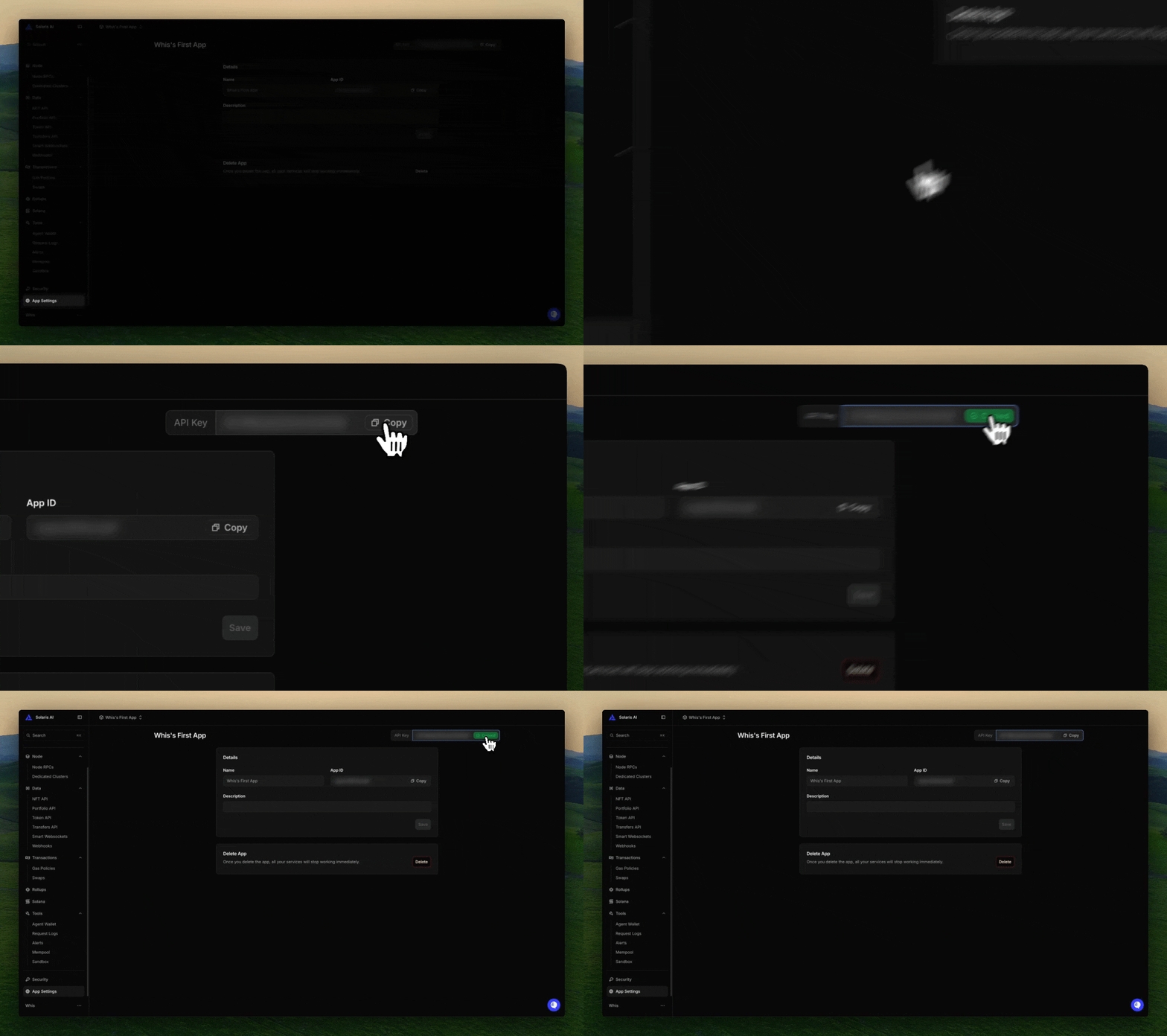
An Alchemy API key. Create a Solana app at dashboard.alchemy.com, then open the app's settings and copy its API key from the top right.
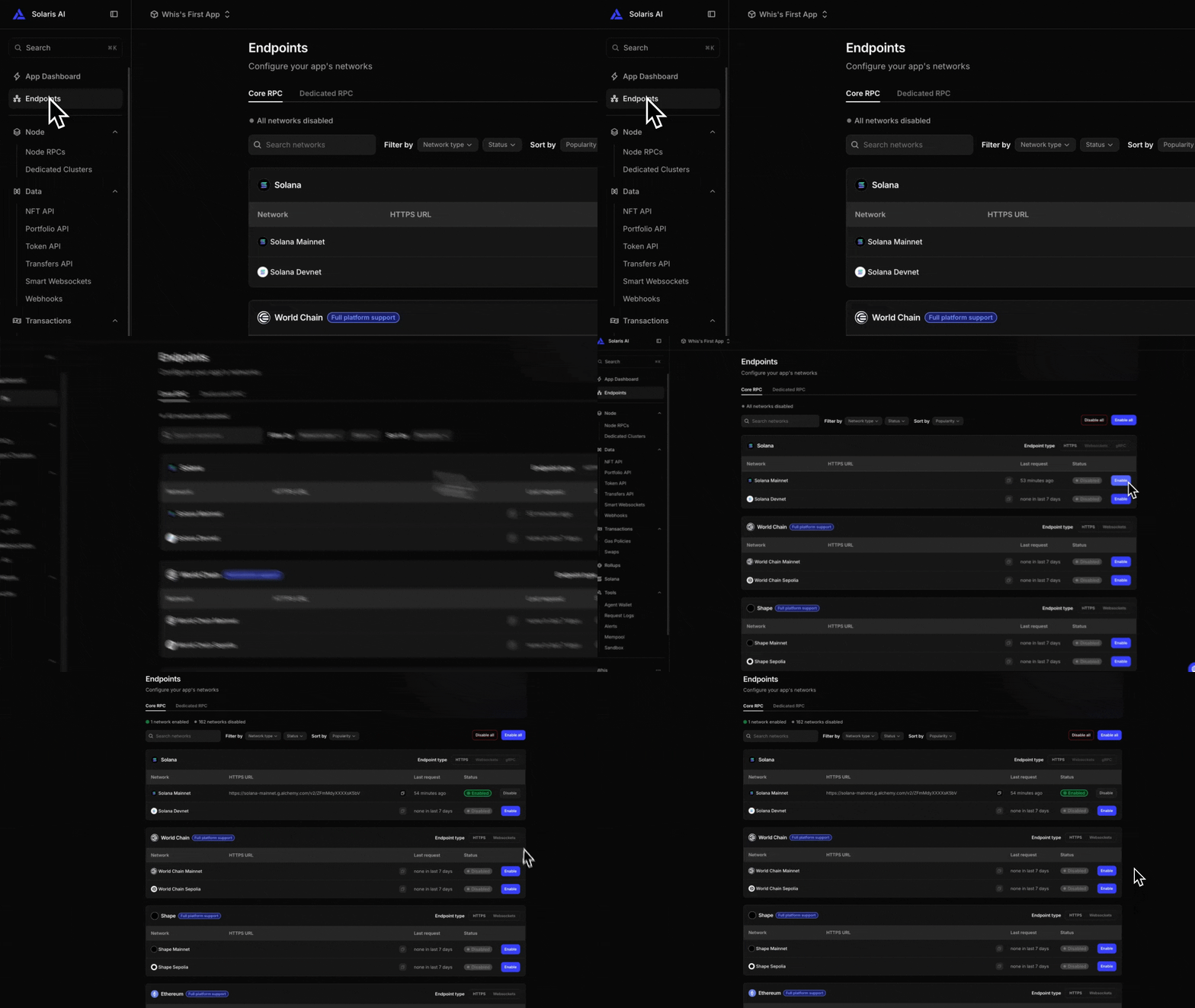
If Solana is not already enabled on the app, turn on Solana Mainnet on its Endpoints page (Core RPC tab) so the key serves Solana data.
-
Add it as an Alchemy credential in Connections.
-
For the Assets (DAS) operations, the Solana Digital Asset Standard API must be enabled on your Alchemy account. It is currently a request-only gated Beta with no dashboard toggle, so email Alchemy Data Services at
data-services-product@alchemy.comto request access (see Errors for the exact failure and workarounds). Once Alchemy makes DAS generally available, expect it to become self-serve and this email step to no longer be needed. The Prices, Portfolio (Token Balances, which runs on the Portfolio Data API), and raw RPC operations work without it.
The same API key powers every data operation below. The optional Auth Token on the credential is used only by the Alchemy Wallet Activity trigger, not by this node.
Quickstart
A common shape is trigger, read, act: a trigger starts the run, the Alchemy node reads on-chain or market data, and a later node acts on the result. This example watches a wallet's SOL balance on a schedule and sends a Telegram message.
- Add a Cron Trigger as the first node (or a Manual Trigger while you test).
- Add an Alchemy node from the Integrations group and draw an edge from the trigger to it.
- In the Alchemy node, pick a credential, set Operation to SOL Balance, and paste a wallet into the Address field (or wire
{trigger.payload.address}from the trigger). - Add a Condition node after Alchemy. SOL Balance returns lamports at
{alchemyResponse.data.value}(1 SOL is 1,000,000,000 lamports); compare that against your threshold. - On the matching branch, add a Telegram node to send the alert, an AI node to summarize the result, or a Code node to reshape it. Reference the balance with
{alchemyResponse.data.value}.
The same trigger, read, act shape works for any operation. Swap step 3 for Token Balances to read a whole wallet, Token Price (by symbol) to track a price, Largest Token Holders for concentration, or Signature Statuses to gate a flow on a confirmation.
Operations
Pick an operation in the node's config dialog. The dialog shows only the inputs that operation needs and relabels the address field to match the operation (Wallet Address, Owner Address, Creator Address, Update Authority Address, Token Account Address, Program ID, or Delegate Address).
Each table below lists the picker label you select in the UI, the underlying method name (useful for matching Alchemy's own docs), and what to use it for.
Prices
USD pricing from the Alchemy Prices API, aggregated across exchanges and DEXes.
| Picker label | Method | Use it for |
|---|---|---|
| Token Price (by mint) | getTokenPriceByAddress | Current USD price for one or more token mints (comma-separate up to 25 per call). |
| Token Price (by symbol) | getTokenPriceBySymbol | Current USD price for one or more ticker symbols (comma-separate up to 25). |
| Historical Prices | getHistoricalPrices | Past price candles for a single symbol or mint over a time range. |
Historical Prices prices either a symbol or a mint (pick one with the "Price by" toggle) and takes a candle interval of 5m, 1h, or 1d.
The time range is a rolling preset by default (Last 1 hour / 24 hours / 7 days / 30 days). Presets are resolved at each run, so a scheduled workflow always pulls the most recent window rather than a date range frozen when you saved the node. Choose Custom range to pick explicit UTC start and end times instead.
Each interval has a maximum span per request: 5m up to 7 days, 1h up to 30 days, 1d up to 1 year. A custom range wider than its interval's cap is rejected with a clear message (the presets always stay within their default interval's cap). Custom times are ISO-8601 strings or unix seconds.
Portfolio
| Picker label | Method | Use it for |
|---|---|---|
| Token Balances | getTokenBalances | Fungible token holdings plus native SOL for one wallet, with metadata and USD prices. |
Token Balances runs on Alchemy's Portfolio Data API, so it works on the free plan with no extra setup and returns balances, token metadata, and USD prices (plus native SOL) in one call. For NFTs, use the Assets (DAS) operations below (Search Assets with a non-fungible token type, or Assets by Owner), which require Solana DAS access.
Assets (DAS)
Metaplex Digital Asset Standard reads for NFTs, compressed NFTs, fungible tokens, and Token-2022 assets.
| Picker label | Method | Use it for |
|---|---|---|
| Get Asset | getAsset | Full metadata and ownership for a single asset. |
| Get Assets (batch) | getAssets | Batch metadata for many asset IDs in one call (up to 1000). |
| Assets by Owner | getAssetsByOwner | All assets owned by a wallet. |
| Assets by Creator | getAssetsByCreator | All assets minted by a creator (verified only). |
| Assets by Authority | getAssetsByAuthority | All assets under an update authority. |
| Assets by Group | getAssetsByGroup | All assets in a collection or group. |
| Search Assets | searchAssets | Flexible asset search by owner and token type. |
| Asset Signatures | getAssetSignatures | Transaction signatures touching a compressed asset. |
| NFT Editions | getNftEditions | Edition NFTs minted from a master edition. |
| Token Accounts | getTokenAccounts | Token accounts for an owner and/or a mint. |
Assets by Group defaults its group key to collection when you supply only a value, the common case. Search Assets accepts a token type of all, fungible, nonFungible, regularNft, or compressedNft, set in the Token Type dropdown.
Pagination. The DAS list operations (Assets by Owner / Creator / Authority / Group, Search Assets, Asset Signatures, Token Accounts) take a Limit of 1 to 1000 (default 50) that sizes the first page. There is no page-number field. To page further, put a cursor in Advanced Parameters (before, after, or cursor) using the cursor returned in the previous response. limit and page are protected and cannot be set through Advanced Parameters.
The asset operations expose two optional advanced controls:
- Display Options: checkboxes for the DAS response-shaping flags (
showFungible,showCollectionMetadata,showUnverifiedCollections,showZeroBalance,showInscription). - Advanced Parameters (JSON): a JSON object merged into the request, so you can set anything the endpoint accepts without a dedicated field, e.g.
sortBy, cursor pagination (before/after/cursor), and the fullsearchAssetsfilter set (creatorVerified,frozen,burnt,compressed,royaltyTarget, …). It is merged alongside the node's built-in params, but for safety it cannot override the required identifier (id,ownerAddress, …) or thelimit/pageclamp. Must be a JSON object. The value is parsed literally: template variables ({trigger...}) are not resolved inside it.
RPC
Raw Solana JSON-RPC, Alchemy-enhanced. These do not need DAS access. In the picker they are split into four groups, shown below.
RPC: Accounts
| Picker label | Method | Use it for |
|---|---|---|
| SOL Balance | getBalance | Native SOL balance, in lamports, for an account. |
| Account Info | getAccountInfo | Parsed account data for any pubkey. |
| Multiple Accounts | getMultipleAccounts | Parsed account data for a batch of pubkeys (up to 100). |
| Program Accounts | getProgramAccounts | All accounts owned by a program (filterable; can be large). |
| Largest SOL Accounts | getLargestAccounts | The 20 largest accounts by native SOL balance. |
RPC: Tokens
| Picker label | Method | Use it for |
|---|---|---|
| Token Accounts by Owner | getTokenAccountsByOwner | SPL token accounts owned by a wallet, optionally one mint. |
| Token Accounts by Delegate | getTokenAccountsByDelegate | SPL token accounts a wallet is the delegate for, optionally one mint. |
| Token Account Balance | getTokenAccountBalance | Balance of a single SPL token account. |
| Largest Token Holders | getTokenLargestAccounts | Top holders of a mint, resolved to owner wallets. |
| Token Supply | getTokenSupply | Total and circulating supply of an SPL token mint. |
RPC: Transactions
| Picker label | Method | Use it for |
|---|---|---|
| Transaction | getTransaction | Decoded transaction by signature. |
| Signatures for Address | getSignaturesForAddress | Recent transaction signatures for an address. |
| Signature Statuses | getSignatureStatuses | Confirmation status of one or more signatures (up to 256). |
| Simulate Transaction | simulateTransaction | Dry-run a serialized transaction without broadcasting it. |
RPC: Network & Fees
| Picker label | Method | Use it for |
|---|---|---|
| Current Slot | getSlot | The node's current slot. |
| Epoch Info | getEpochInfo | Current epoch, slot index, and slots remaining in the epoch. |
| Block | getBlock | Block metadata for a slot (transaction list optional via Advanced Parameters). |
| Block Time | getBlockTime | Estimated unix timestamp for a confirmed block slot. |
| Latest Blockhash | getLatestBlockhash | Latest blockhash and last valid block height. |
| Recent Priority Fees | getRecentPrioritizationFees | Recent prioritization fees observed on the network. |
| Priority Fee Estimate | getPriorityFeeEstimate | Recommended priority fee tiers for a transaction. |
| Fee for Message | getFeeForMessage | Fee in lamports for a base64 transaction message. |
| Rent-Exemption Minimum | getMinimumBalanceForRentExemption | Minimum lamports to rent-exempt an account of N bytes. |
Largest Token Holders does extra work: Alchemy returns the top token accounts for a mint, and the node resolves each to its owner wallet in a second hop and aggregates by owner, so the result reflects unique holders. Priority Fee Estimate works with no inputs at all, in which case it returns a network-wide ("global") estimate, the usual "what is a good fee right now?" case.
A few of these reads accept a config object, but with safe defaults so the common case needs no setup:
- Program Accounts returns every account a program owns, which can be a very large response. It defaults to
jsonParsedencoding; use Advanced Parameters to narrow it withfilters(memcmp / dataSize), adataSlice, or a differentencoding. - Block defaults to metadata only (no transaction list), since a full block can be many megabytes. Opt into more via Advanced Parameters with
transactionDetails(none/signatures/full) andrewards. - Signature Statuses searches transaction history, so signatures older than the node's recent status cache still resolve, the usual "did my transaction confirm?" check.
- Fee for Message takes a base64-encoded compiled message (not a full signed transaction).
Configuration
The dialog shows only the fields the chosen operation needs. The names below are the labels as they appear in the dialog.
| Field (in dialog) | Required | Description |
|---|---|---|
| Node Label | Yes | The node's name on the canvas. Defaults to Alchemy. |
| Response Name | Yes | How downstream nodes reference the output. Defaults to alchemyResponse. |
| Credential | Yes | An Alchemy credential that has an API key. Notify-token-only credentials show (no API key) and are disabled, because they cannot power data reads. |
| Operation | Yes | The operation to run, from the grouped picker (Prices / Portfolio / Assets (DAS) / RPC: Accounts / Tokens / Transactions / Network & Fees). |
| Address (relabeled per operation: Wallet, Owner, Creator, Update Authority, Token Account, Program ID, or Delegate Address) | Varies | A single pubkey; its meaning is set by the operation. |
| Token Mint | Varies | A token mint (Token Price by mint, Largest Token Holders, Token Supply), or an optional mint filter on the token-account operations. |
| Asset ID / Master Edition Mint | For asset ops | A DAS asset ID, or the master edition mint for NFT Editions. |
| Asset IDs / Account Addresses / Signatures | For batch ops | Comma-separated or JSON array: asset IDs (Get Assets), pubkeys (Multiple Accounts), or signatures (Signature Statuses). |
| Transaction Signature | For Transaction | A single transaction signature. |
| Symbol | For symbol prices | One or more ticker symbols, comma-separated. |
| Group Key / Group Value | For Assets by Group | Collection or group key and value (key defaults to collection). |
| Token Type | No | Search Assets filter: all, fungible, nonFungible, regularNft, or compressedNft. |
| Serialized Transaction (base64) / Base64 Message | For Simulate / Fee for Message | Base64 transaction (Simulate Transaction; optional for Priority Fee Estimate) or base64 compiled message (Fee for Message). |
| Account Keys | No | Comma-separated pubkeys for the priority-fee operations. |
| Slot | For Block / Block Time | A block slot number. |
| Account Data Length (bytes) | For Rent-Exemption Minimum | Account data length in bytes (an SPL token account is 165). |
| Time Range | For Historical Prices | Rolling window (Last 1 hour / 24 hours / 7 days / 30 days) resolved at run time, or Custom range for explicit dates. |
| Start (UTC) / End (UTC) / Interval | For Historical Prices (custom range) | Explicit range and candle interval (5m, 1h, 1d). Ignored when a rolling preset is set. |
| Limit | No | First-page size for list operations (1 to 1000, default 50); page further with a cursor in Advanced Parameters. |
| Display Options | No | DAS response-shaping switches (Include fungible tokens, Include collection metadata, Include unverified collections, Include zero-balance assets, Include inscription details) on the asset operations. |
| Advanced Parameters (JSON) | No | A JSON object. For DAS ops it is merged into the request (sortBy, cursors, Search Assets filters) and cannot override the required ID/owner or the limit/page clamp. For Program Accounts / Block it is the raw RPC config object (filters / dataSlice / encoding, or transactionDetails / rewards). |
Most string fields accept template references such as {trigger.payload.address}, so an upstream node or trigger can feed the input.
Output
Most operations return the standard envelope, with the raw Alchemy response under data:
{
  "success": true,
  "operation": "getAsset",
  "data": { /* raw Alchemy response */ }
}
Some operations echo the resolved input alongside data: address-scoped reads echo address, Transaction echoes signature, Token Supply echoes mint, and Block / Block Time echo slot. Reference fields downstream with the response name (default alchemyResponse), for example {alchemyResponse.data.id}, or {alchemyResponse.data.value} for SOL Balance (in lamports).
Largest Token Holders (getTokenLargestAccounts) is the one shape exception: it returns aggregated holders and the raw tokenAccounts rows alongside, not under data:
{
  "success": true,
  "operation": "getTokenLargestAccounts",
  "mint": "DezX...",
  "holders": [{ "owner": "Wallet1...", "amount": "1000000", "tokenAccountCount": 2 }],
  "tokenAccounts": [{ "tokenAccount": "Account1...", "owner": "Wallet1...", "amount": "500000" }]
}
Errors
When an Alchemy call fails, the node fails and the run is marked failed (see Error Handling). The error message, and a hint where one applies, appear on the node in Run Detail. Common cases:
- 401 / 403 - the API key is not recognized. Update the Alchemy credential.
- 429 - Alchemy rate limit or compute-unit cap exceeded. Retry later or raise your Alchemy plan.
- An Assets (DAS) operation fails with "Unable to complete request at this time" (error
-32001) - the Solana DAS API is not available on your Alchemy account. This is a gated Beta, not a transient outage: the same key still runs Token Balances, Prices, and the raw RPC operations. DAS is not a self-serve service in the Alchemy dashboard (there is no toggle for it), so access is request-only: email Alchemy Data Services atdata-services-product@alchemy.com(that reflects the current gated Beta; once Alchemy makes DAS generally available, expect it to become self-serve with no request needed). The node detects this and fails fast with that guidance instead of retrying. For fungible balances you do not need DAS at all - use Token Balances (Portfolio API) or Token Accounts by Owner (raw RPC).
Common use cases
- Read a wallet's full token portfolio with balances and USD prices in one step (Token Balances).
- Price a basket of tokens before a swap (Token Price (by mint) with several comma-separated mints).
- Find a memecoin's top holders for concentration analysis (Largest Token Holders), or track its circulating supply (Token Supply).
- Check whether a transaction confirmed before continuing a flow (Signature Statuses).
- Read all accounts a program owns, filtered to a layout, for protocol-level automation (Program Accounts with
filtersin Advanced Parameters). - Estimate a fair priority fee (Priority Fee Estimate), then dry-run a transaction with Simulate Transaction before signing it elsewhere.
Next steps
- Alchemy Wallet Activity trigger - run a workflow in real time on wallet activity
- Helius - alternative Solana DAS and RPC provider
- Birdeye - token price analytics