
Alchemy Wallet Activity Trigger
Run a workflow in real time when a watched Solana wallet sends or receives SOL or tokens.
The Alchemy Wallet Activity trigger fires your workflow the moment a watched Solana wallet has on-chain activity: sending or receiving SOL or SPL tokens. It is powered by Alchemy's Address Activity webhooks, so deliveries arrive in near real time rather than on a schedule.
A wallet activity trigger needs exactly one Alchemy Address Activity webhook (Solana Mainnet, the only supported network) delivering events to your workflow. There are two ways to put that one webhook in place, and you pick one, not both:
- Recommended, Solaris-managed: give Solaris your Alchemy Auth Token and it creates the webhook for you when you activate, keeps its watched addresses in sync as you edit, and removes it when you deactivate.
- Manual fallback: you create the Address Activity webhook in Alchemy yourself and paste the trigger's Webhook URL (the delivery URL Solaris AI shows in the trigger's config dialog) into Alchemy's Webhook URL field, then manage it (and its address list) by hand.
Most people want the managed path: it also signature-verifies every delivery (see Security) and keeps the watched-address list from silently drifting out of sync with the trigger.
Keep the workflow inactive while you are still building it. The Webhook URL is generated before activation, but deliveries only create runs after the workflow is active. Once a webhook points to that URL and the workflow is active, every watched-wallet event can trigger a real run that uses credits. Activate only when the workflow is finished, and deactivate again before you go back to editing, especially for busy wallets.
Setup (recommended)
Let Solaris create and manage the webhook for you. You only need your Alchemy Auth Token.
-
Add an Alchemy Wallet Activity trigger to your canvas, enter the Solana wallet addresses to watch (one per line or comma-separated), and copy its Webhook URL from the config dialog.
-
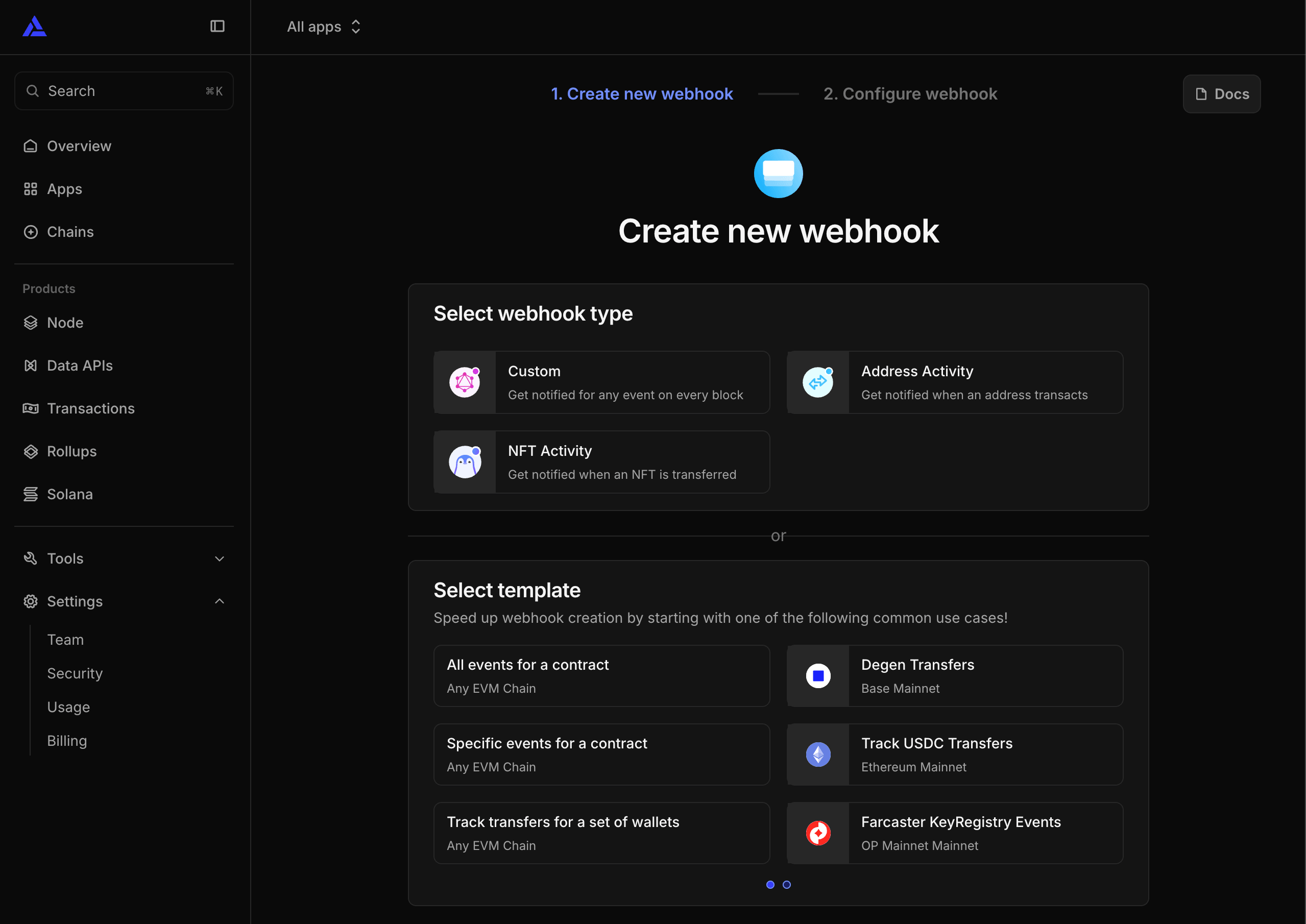
Open the Alchemy Webhooks dashboard. If your account already has a webhook, the Auth token is in the page header, skip to step 4. On a fresh account Alchemy redirects you to the create flow: create one Address Activity webhook purely to reveal the token.
-
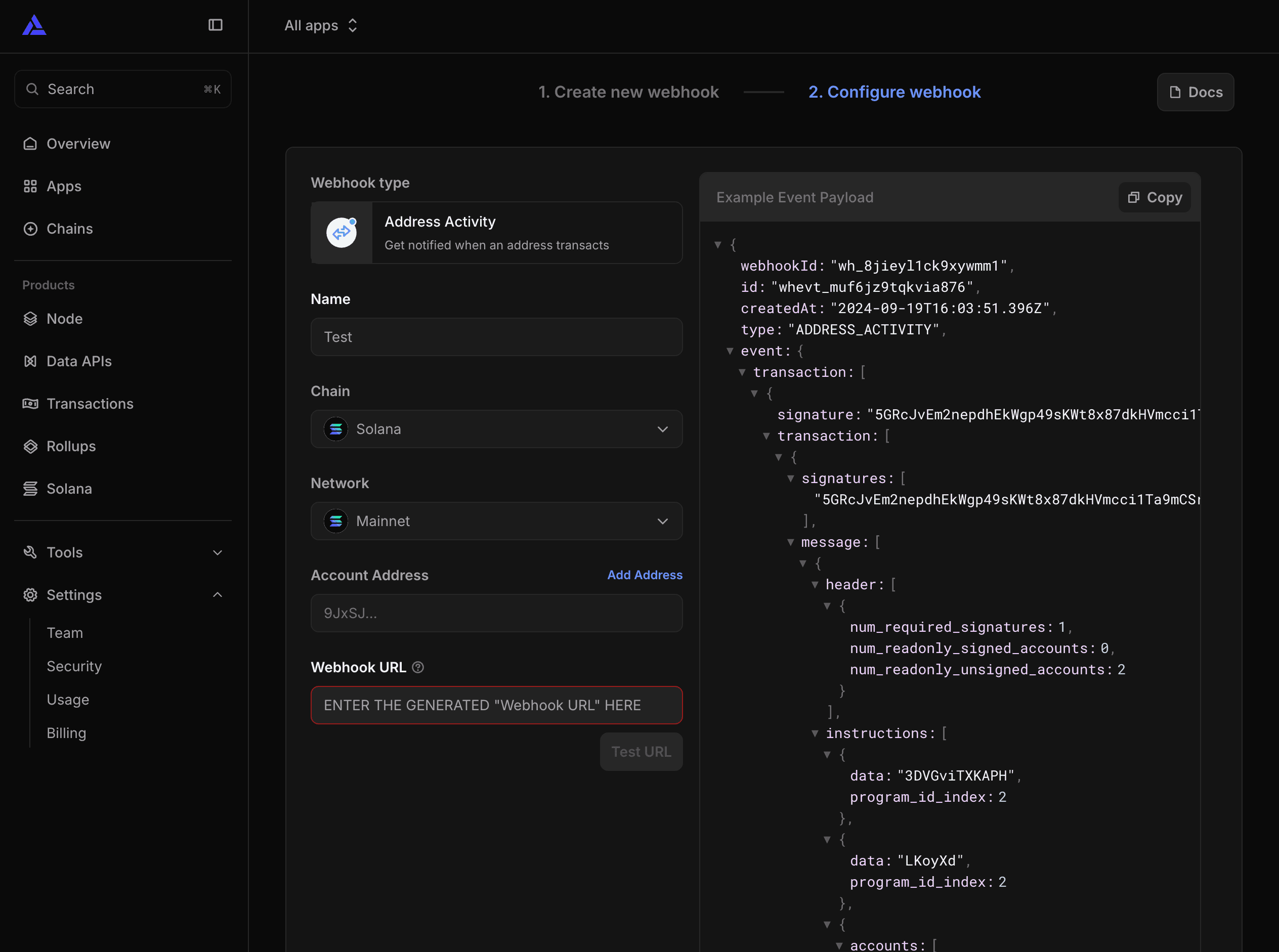
Set Chain to Solana and Network to Mainnet, add the same watched wallet addresses under Account Address, paste the trigger's Webhook URL into the Webhook URL field, and create the webhook.
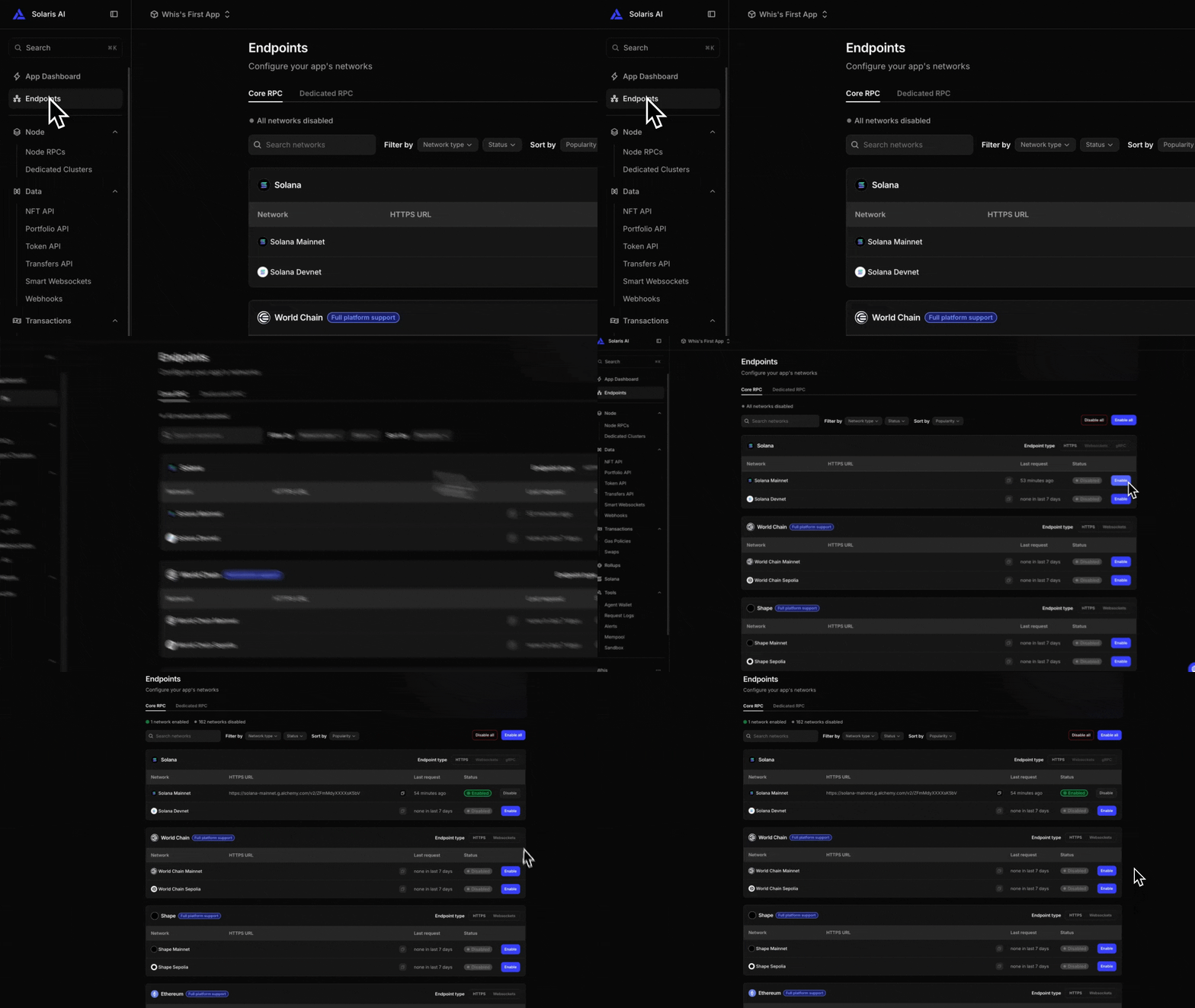
Don't see Solana in the Chain list? Your Alchemy app needs the network enabled first. Open the app's Endpoints page, and on the Core RPC tab enable Solana Mainnet, then come back to the webhook.
-
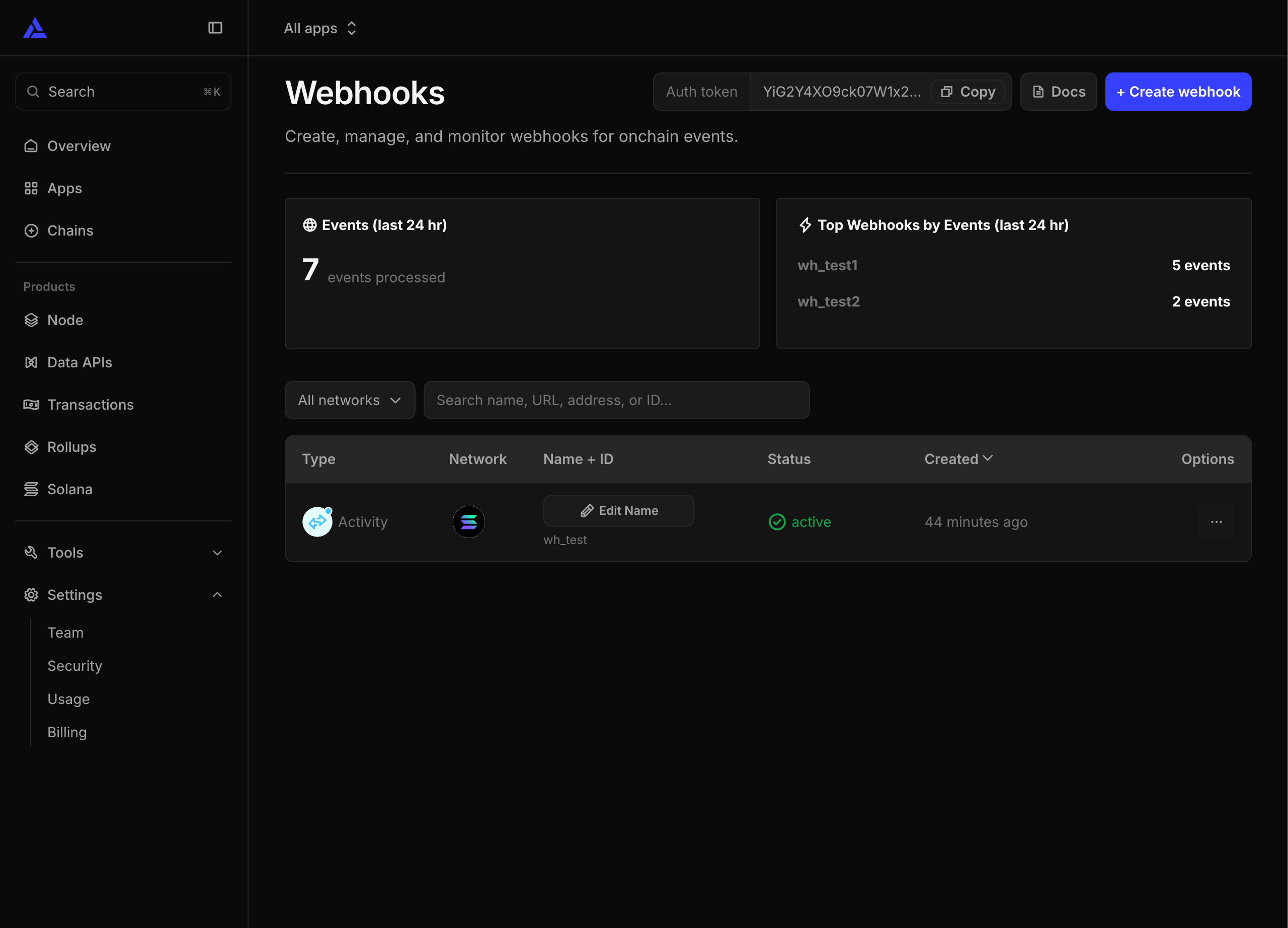
Copy the Auth Token from the header of the Webhooks page (it has a Copy button). It is account-level (the same for every webhook) and separate from any app's API key.
-
In Connections, open (or create) your Alchemy credential and paste the token into the Auth Token field, under Show optional fields. A credential can hold just this token, just an API key, or both.
-
Activate the workflow when it is ready (keep it inactive while you are still building, see the note above). Solaris creates the managed Address Activity webhook for those wallets, keeps its address list in sync as you edit, and removes it when you deactivate or delete the workflow. Deliveries are signature-verified (see Security).
If you created a temporary webhook to reveal the Auth Token, it is now redundant but harmless: leave it or delete it. Its deliveries are signed with a different key, so Solaris rejects them with 401 before any run is created (no double runs). If you delete it and then activate, a new webhook will "reappear" in Alchemy, that is Solaris creating its own managed one through your Auth Token, which is exactly how this path is meant to work.
Manual setup (advanced)
Use this only if you would rather not give Solaris an Auth Token. You create the webhook and keep its watched-address list in sync yourself.
- Follow steps 1-3 of the recommended setup to create the Address Activity webhook with your trigger's Webhook URL and watched wallets. Then stop: do not add an Auth Token. That webhook is now your delivery channel.
- Activate the workflow. You can then click Test URL in Alchemy to confirm delivery (see Activating for why the test only succeeds once the workflow is active).
Do not also add an Auth Token to the credential for this workflow. If you do, activating it makes Solaris provision its own managed webhook as well, and from then on the hand-made one is the redundant webhook whose deliveries are rejected with 401. Pick one path, not both.
Configuration
| Field | Description |
|---|---|
| Trigger Label | Display name shown on the canvas. |
| Watched Wallets | The Solana wallets to watch, one per line or comma-separated. Validated as base58 addresses, deduplicated, and capped at 1000 per trigger. |
| Webhook URL | The generated delivery URL (carries a unique per-trigger token). Copy this for the manual path. |
| Sample Payload | An example Address Activity body used for previews and reruns while you build downstream nodes. |
The settings Input pane previews the sample payload so downstream nodes resolve fields (for example {walletActivity.event.transaction[0].signature}) before any real delivery arrives.
A trigger is only considered runnable when it has both a generated token and at least one valid watched wallet. A trigger with no wallets will not provision a webhook and cannot be activated.
Activating
The trigger only fires after you Activate the workflow. Activating or deactivating changes the desired webhook state, so the auto-provisioned webhook is created on activate and removed on deactivate. Inactive workflows reject deliveries.
The Webhook URL is generated as soon as you add the trigger, well before you activate, so you can paste it into Alchemy at any time. A delivery, though, is only accepted while the workflow is active: against an inactive workflow the endpoint replies 403 Workflow is not active. So Alchemy's Test URL button reports failure until you activate, then succeeds, this is why it does not work "either way". Test the path you actually use, too: on the automatic path Solaris AI Flow's own webhook is the signature-valid one, so a hand-created webhook's Test URL returns 401.
Security
Auto-provisioned deliveries are verified. Alchemy signs every Address Activity delivery with an HMAC-SHA256 of the raw body in the X-Alchemy-Signature header, and Solaris AI Flow checks it against the webhook's signing key. A delivery with a missing or invalid signature is rejected with 401.
Manually configured deliveries (no stored signing key) fall back to the secret URL token, the same model as the generic Webhook trigger.
Delivery limits
Solana finalizes quickly, so a busy or misconfigured watched wallet (for example an exchange hot wallet) can fire constantly, and every accepted delivery is a workflow run that uses credits. To protect you, wallet-activity deliveries are rate limited per workflow (sustained about one per second with a short burst allowance). Excess deliveries are shed with 429 before any run is created; Alchemy retries with backoff, so legitimate bursts still drain over time.
Retried deliveries are deduplicated on the event's stable id, so the same event never runs your workflow twice.
Output
The trigger output is the Alchemy Address Activity body spread onto the trigger envelope, plus the stable triggeredAt and source fields. The default response name is walletActivity.
Solana Address Activity deliveries use a different shape from Alchemy's EVM webhooks: the activity is under event.transaction[] (an array of transactions), not event.activity[]. A trimmed delivery looks like:
{
  "webhookId": "wh_8jieyl1ck9xywmm1",
  "id": "whevt_muf6jz9tqkvia876",
  "createdAt": "2024-09-19T16:03:51.396Z",
  "type": "ADDRESS_ACTIVITY",
  "event": {
    "transaction": [
      {
        "signature": "5GRcJvEm2nepdhEkWgp49sKWt8x...",
        "transaction": [{ "message": [{ "account_keys": ["5auZ...", "1111..."] }] }],
        "meta": [{ "fee": 15000, "pre_balances": [2068097212], "post_balances": [2068082212] }],
        "index": 93,
        "is_vote": false
      }
    ],
    "slot": 290766538,
    "network": "SOLANA_MAINNET"
  }
}
Common template references for that body:
{walletActivity.id}                                the event id (also used for dedup)
{walletActivity.event.network}                     "SOLANA_MAINNET"
{walletActivity.event.slot}                        290766538
{walletActivity.event.transaction[0].signature}    the transaction signature
{walletActivity.event.transaction[0].meta[0].fee}  fee in lamports
{walletActivity.triggeredAt}                        ISO timestamp added by Solaris AI Flow
{walletActivity.source}                            "webhook"
Note the single-element array wrappers Alchemy uses for Solana (transaction[], message[], meta[]), which is why the [0] indexes appear in the paths. The exact shape still varies by event, so paste a representative delivery into the Sample Payload editor to build against it. As with the generic webhook trigger, the envelope fields (triggeredAt, source) win on key collision.
Limits
Wallet Activity triggers count toward your webhook workflow allowance: up to 10 active webhook workflows per account (a universal safety limit, the same for everyone).
Next steps
- Alchemy node - query Solana data, prices, and assets
- Webhook Trigger - generic inbound HTTP trigger
- Cron Trigger - schedule-based automation